


Important to any business that is project-based – particularly within the professional services industry – NetSuite’s new features are designed to help resource managers allocate the right resources to projects based on availability, skill sets, and other criteria. With the new features also comes a new resource manager role.
Resource allocation enables companies to have a true understanding of employee utilisation, a critical efficiency / productivity metric. NetSuite customers can monitor the metrics that matter most to them – worked hours, allocated hours, or assigned hours. These values are divided by available hours, taking into account work calendars and exempt time.
So what do the new features include?
1. Resource Allocations Chart
As a project or resource manager, one of the most important aspects of your role is to monitor each of your resources so that you can effectively balance their workloads and avoid some resources being over-allocated while others are under-allocated.
With the 2014.1 release, NetSuite introduced the resource allocation chart with drag-and-drop simplicity.
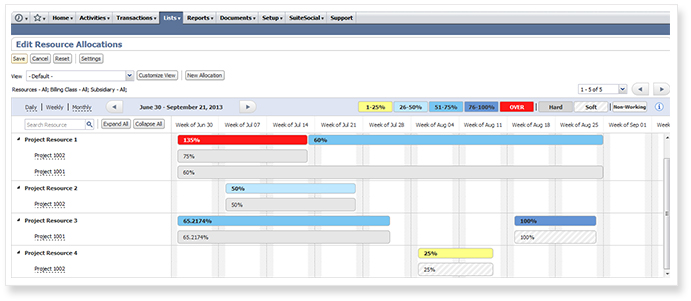
The new dynamic, real-time chart provides an intuitive visual representation that enables project and resource managers to easily view an individual resource’s workload and availability. You can review at a glance how efficiently your resources are being utilised and whether you need to make any adjustments by viewing their workloads and availability.
With the resource allocation chart, users can manage their resources by editing, creating, dragging and dropping allocations. They can easily search, view, match and select resources for allocation to projects. And the settings can be edited to suit visual preferences.
2. Resource Skills Sets
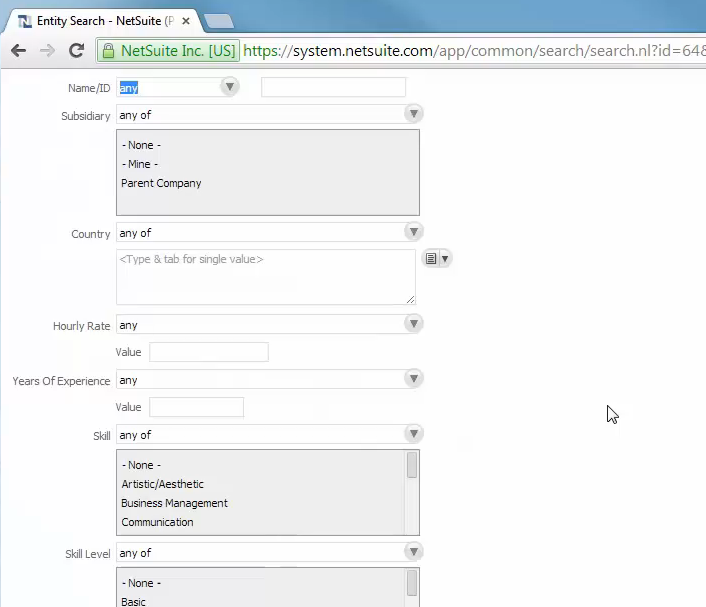
New capabilities enable project and resource managers to search for and allocate resources based on skills, demographic information, experience, language expertise, work preferences, proxy capabilities and more. Project and resource managers can now:
- Conduct advanced resource searches to find the right resources based on multiple factors, including availability and skills:
- Quickly filter lists of resources based on a single attribute such as skill, education, department or job code
- Flexibly view and search all active and inactive resources, including contractors and other specialty resources
- View resource utilisation in calendar view and graphical booking chart view
With the new feature, individual resources can now:
- Create a repository of skill sets to match the requirements of a project
- Boost their profile by adding soft skills and level of expertise
- Upload recent CV, work samples and enter a URL that showcases their portfolio and achievements
3. Resource Allocation Record
Once a resource has been allocated or reserved to a project, a project manager may decide to assign that resource to a specific task.
With the new release, a new record type has been created for resource managers to allocate resources to projects for a specific number of hours over a defined period of time. This enables companies to get a good sense of employee utilisation, a critical efficiency and productivity metrics.
If you would like to find out more about NetSuite’s new resource allocation features, please don’t hesitate to get in touch with one of our experts.